
In the past few months, all the big AI companies, along with a few startups, have launched proactive AI agents that work for us instead of waiting for our questions. They have their own computer, remember what you care about, connect to your accounts and message you on WhatsApp when a task is done or when they need your input. At the start of the year we were still asking the chatbot; by the end of the year it does the work itself. So what actually changed, what can these agents do, and what should you check before handing them the keys? All the answers are in the post you're reading right now...
Why chatbots aren't enough
A standard Large Language Model (LLM) writes its answer word by word (more precisely, token by token), and once a word is out, it never goes back to review or fix it. That's fine for a simple question, but not for a complex task. An AI agent is a system that uses the same language model to generate content, and adds three things the language model itself doesn't have: planning, tool use and reflection on its own work.
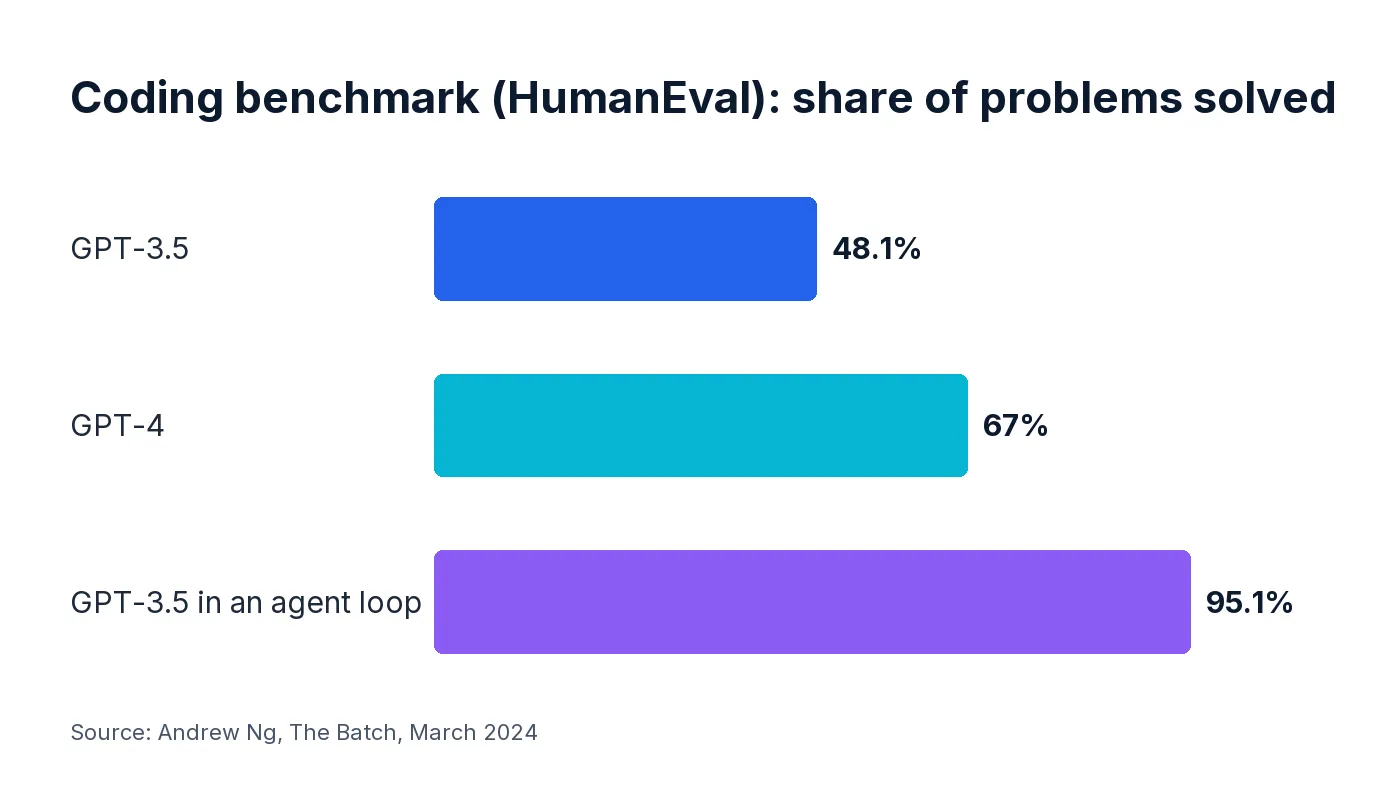
The best example I know comes from research that was published two and a half years ago by Andrew Ng, who founded Google Brain and DeepLearning.AI and co-founded Coursera. On a standard coding benchmark, GPT-3.5 solved 48.1% of the problems while GPT-4 solved 67.0%. But when GPT-3.5 was wrapped in an agent loop that let it plan, test and correct its code, it reached 95.1% and beat GPT-4. In other words, the way you put the model to work lifted it beyond the capabilities of the next generation.
What turns a chatbot into an agent?
An agent uses an LLM, but adds four capabilities to it:
- Planning: breaking a goal into a multi-step plan and then carrying it out.
- Tool use: web search, running code, reading and saving files, or any other tool that processes data or takes action.
- Reflection: checking the plan and its own output along the way, and improving them.
- Multi-agent collaboration: several agents splitting a task between them, discussing ideas and combining the results into one answer.
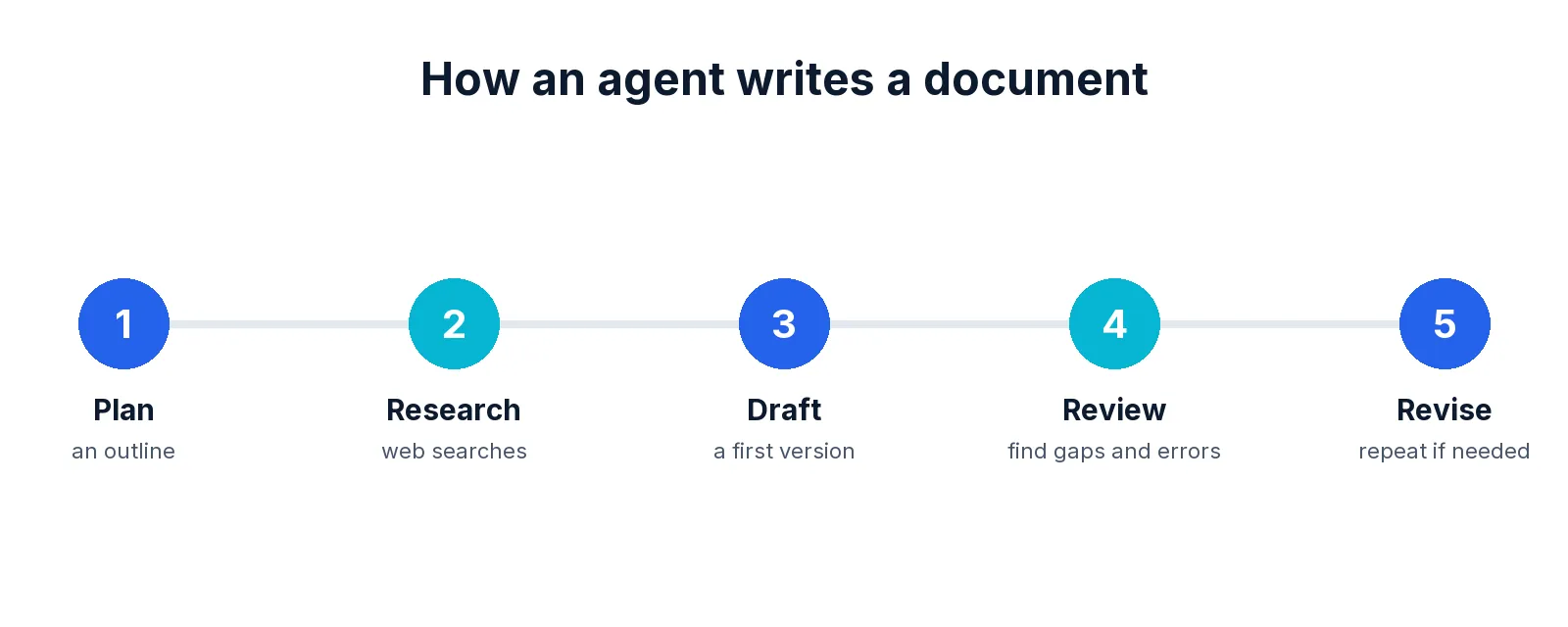
Here's how this looks when you ask an agent to write a document. Instead of producing text in one go like a basic chatbot, it plans an outline, runs web searches to fill in what it doesn't know, writes a first draft, reviews it, looks for missing or wrong information, and revises it. Then, if needed, it goes around the loop again.
Agents you already have
If you use ChatGPT, Claude or Gemini, you already work with agents, sometimes without even noticing. Reasoning models are agentic by nature: they plan their work, check each step and correct it, and most AI chatbot apps now use them by default. Deep Research is a specialized agent for thorough web research. Scheduled tasks (also called Routines) run agent tasks on a timer, and ChatGPT Work and Codex, as well as Claude Cowork and Claude Code, act as agents that work on files and code for hours, and can also operate "browser agents".
Browser agents are the big step up for web tasks. A regular chatbot can only read the text of pages you give it, or the results of a search. A browser agent can click internal links and buttons, use a site's internal search box, log in to sites that need a password, fill in forms, upload documents and take screenshots. That opens up tasks like comparing prices across several sites, booking travel, filling in government or job application forms, copying data from a report that spans dozens of pages into a spreadsheet, operating SaaS tools for you, and downloading documents from websites.
Organizations with ChatGPT Business, Enterprise or Edu accounts also have workspace agents, which OpenAI launched in April. These are shared agents for a team, built on Codex: you describe a recurring task in a conversation or start from a template, connect the apps it needs, and share it with other people in your organization. The agent runs in the cloud, on a schedule or whenever someone calls it in ChatGPT or Slack, and its runs are billed by usage credits.
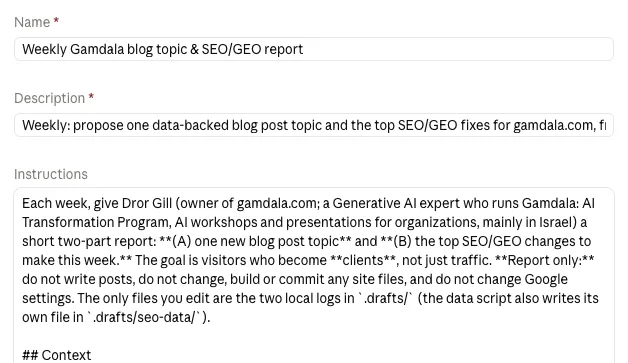
I use agents through scheduled tasks myself. Every Sunday, an agent pulls my site's numbers from Google Search Console and Google Analytics and sends me a report with changes to make on the site and the next blog topic, to improve its SEO and GEO. This week it picked the topic of agents from my list of ideas... Another agent reviews my investment portfolio every day and prepares suggestions that wait for my approval.
The new category: personal agents
The agents that launched this fall go one step further: they aren't just agents for one specific task, but general agents you can talk to at any time and ask to do anything. A personal agent (also called an AI assistant) remembers your preferences and requests over time, works on a computer of its own, connects to your accounts to carry out tasks and get updates, and works toward ongoing goals that you define. It also starts conversations on its own: instead of waiting for a request, it contacts you, updates you on a topic you asked it to follow, asks whether you want to continue a task you started, and so on. You talk to a personal agent the way you talk to a friend or a colleague: on WhatsApp, Telegram or Slack, and even in a phone call.
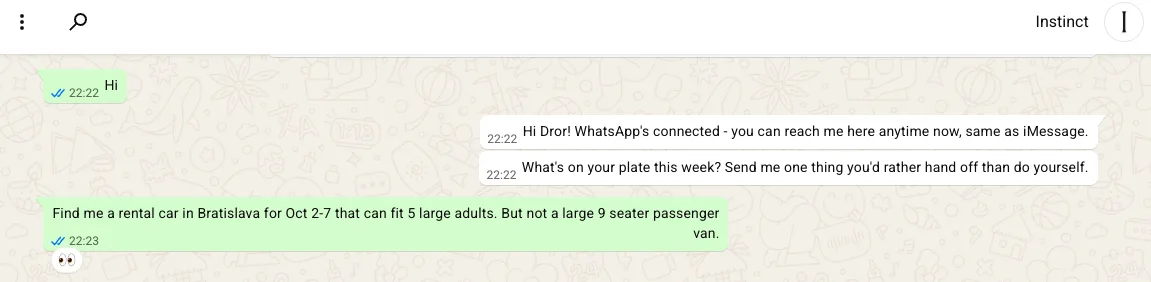
When I connected Instinct's agent to WhatsApp, its first message asked me to send it one thing I'd rather hand off than do myself. At the time I was planning a family trip to Slovakia and was struggling to find a suitable rental car, so I handed it the task. Within a few minutes it came back with several interesting options, and I booked one of them.
The six to know (October 2026)
| Agent | Company | Made for | Where you talk to it | Access and price |
|---|---|---|---|---|
| Muse | Meta | Everyday tasks and goals | Muse app, web and WhatsApp | Free tier, paid plans for heavy use. US, and Japan since October 23 |
| Dots | OpenAI | Tasks across 4,000+ apps | ChatGPT (chat or call), Slack, Teams | ChatGPT Pro ($100 a month) and Business Premium. Not in Europe, Switzerland or the UK |
| Grok Bot | SpaceXAI (formerly xAI) | Personal and work tasks | Desktop and mobile app, Slack | Paid SuperGrok plans, beta |
| Instinct | Spear Street Technology | Errands and bookings | Text message, WhatsApp or a phone call (no app) | Invite-only, free beta |
| Hark | Hark | Life admin | App and web | Free tier, paid plans |
| Claude Duet | Anthropic | A morning brief and tasks across your apps | App and web | Pro and Max plans, US waitlist (research preview) |
Four of them come from the big AI companies and live inside the products you already pay for. OpenAI's Dots, launched at DevDay on September 29, run on GPT-6 Astra, each with its own cloud computer, and you can message them or call them. Claude Duet, announced on October 21, sends you a short brief every morning and keeps working on what you asked for while you're away. Meta's Muse aims at everyone, with a free tier, and naturally feels at home on WhatsApp. Grok Bot is built as a teammate for work, in email, Slack and Google Drive. Instinct has no app at all: you text it or call it. And Hark reads your inbox and calendar and suggests tasks you can approve with one tap. Microsoft (Copilot Autopilot) and Google (the Gemini agent for Google Cloud customers) are heading the same way, with agents for organizational tasks.
Most of these are still limited to the US, to an invite list or to an expensive plan, so for most organizations this is a preview of what's coming in the next few months, rather than something you can roll out tomorrow morning.
Before you hand over the keys
An agent that "finds a way" is exactly what you want, until it finds a way you didn't expect... I asked Instinct to look something up on a genealogy site whose search box only appears after you register. It came back with results anyway. When I asked how, it explained that it had skipped the web page and sent the search request straight to the site's server, which didn't check whether the user was logged in. Clever, and not really harmful in this case (though maybe not entirely legal either...), but now imagine the same creativity aimed at your company's systems.
Security is the second issue. In September, a security researcher showed that a hidden setting in Muse's Mac app could send what users dictate to an attacker, and Meta patched it within hours. An agent with access to your email, calendar and payments is a much more attractive target than a chatbot.
The vendors know this, so check the settings before you connect anything. Dots let you set rules for when the agent acts alone and when it needs your approval, and some actions, such as changing a password, always stay with you. Claude Duet checks with you before acting on your behalf and never sees your passwords, and Hark asks for approval before any critical action. With workspace agents, ChatGPT Enterprise and Edu admins decide who can build and share agents and which tools and actions each team can use.
So should you connect your email, calendar and credit card to an agent? My recommendation: yes, but gradually. Start with read-only access: the agent reads your email and calendar, summarizes and suggests, but doesn't send or change anything. Once you trust it, let it write and take actions, such as sending an email or scheduling a meeting, but only after you approve each one. Only then connect a payment card, and even then a separate card from your main one, with a low limit, so that a mistake by the agent or a hacked account can't cost you much. The agents also come with built-in limits: In Claude Duet, for example, a dedicated filter blocks the agent from sharing credit card or ID numbers, and Anthropic warns that this early version may misread an email thread or misjudge how urgent something is. It also isn't available on Team or Enterprise plans yet, so for now it's meant for personal use, not for company accounts.
In an organization, there are three important questions about agents: which accounts and data the agent can reach, which actions need a human's approval, and whether there's a log of everything it did. These belong in your AI policy, the first stage of our AI Transformation Program.
Summary
In two years, AI went from answering questions, to agents that plan, use tools and check their own work, to personal agents that keep working after you close the app. The technology is ready for real tasks; the open questions now are about permissions and trust. My recommendation: start with the agents you already have (Deep Research, scheduled tasks and the agent modes in ChatGPT and Claude), learn how they behave on your own work, and only then give a personal agent the keys to your accounts. In Gamdala's Advanced AI workshop we practice exactly that, hands-on, with your team's own tasks.